 Skip to content

AI Jargon Demystified: Terms You Need to Know
Feeling lost in a sea of AI buzzwords? You’re not alone. Every day, it seems like a new term—from “LLM” to “hallucination”—is thrown around, making it difficult for a professional or entrepreneur to find solid ground. The truth is, you don’t need to be a computer scientist to use AI effectively. You just need a simple, jargon-free guide to the handful of terms that actually matter for your day-to-day work. This post will cut through the noise and give you the essential vocabulary you need to start using AI with confidence today.
Table of Contents
The Golden Rule: You Don’t Need to Know Everything
The first step to demystifying AI jargon is to accept a simple truth: you don’t need to understand the “how” behind every AI. You don’t need to know how a car’s engine works to drive one, and you don’t need to know the code behind ChatGPT to use it to write a great email. Your goal is not to become an AI engineer, but an effective user. Focus on the function and the outcome, not the technical mechanics.
Core Concepts: The 5 Terms You’ll See Everywhere
There are a handful of core terms that form the foundation of AI and its most popular applications. Understanding these five concepts will give you the confidence to navigate almost any conversation about AI.
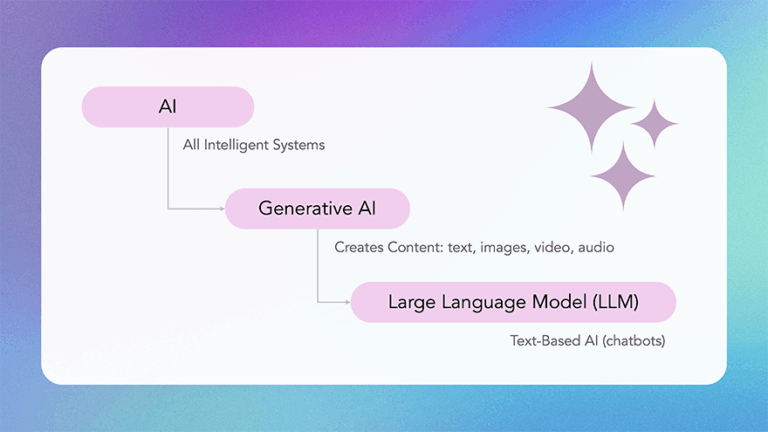
AI (Artificial Intelligence): The Big Umbrella
Think of AI as the entire field of computer science dedicated to creating systems that can perform tasks that would normally require human intelligence. This is the big, all-encompassing term that covers everything from self-driving cars to the spell-checker in your word processor. It’s the highest-level concept you need to know.
Generative AI: The Creator
Generative AI is a powerful and popular type of AI that can create something new. When you ask a tool to draft an email, summarize a report, or brainstorm ideas, you’re using generative AI. Think of it as your first-draft engine. If you’ve ever used a tool like ChatGPT, Midjourney, or Gemini to create new content, you were using generative AI. It is the creator, the brainstorm partner, and the idea engine all in one.
Large Language Model (LLM): The Engine of Generative AI
A Large Language Model, or LLM, is the engine that powers most of the text-based generative AI tools you use. It’s an advanced algorithm that has been trained on a massive amount of text data. This training allows it to understand, summarize, translate, and generate human-like language. An LLM is what makes ChatGPT, Claude, Gemini, and Grok so effective. It’s the brain behind the chat. Prompts are the interface.
Prompt: Your Instructions
A prompt is simply the instruction you give to an AI. It can be a question, a command, or a piece of text you want the AI to analyze. The prompt is your primary method of communicating with an AI. For example, “Draft a marketing email for a new product launch” is a simple prompt. Think of it as the instruction manual for the AI.
Prompt Engineering: The Skill That Pays Off
Prompt engineering is the skill of writing effective prompts to get the best possible output from an AI. It’s a mix of clarity, context, and iterative refinement. Being a skilled prompt engineer is not about being a programmer; it’s about being a great communicator and problem-solver. This is the skill that will define a professional’s success in the AI era.
Putting it to Work: Terms for Practical AI Users
Beyond the core concepts, there are a few other terms you’ll encounter that are worth knowing. These are the tools and concepts that make AI practical for daily use.
NLP (Natural Language Processing): Language In, Language Out
- NLP is how computers work with human language—understanding, extracting, summarizing, translating, and generating text. LLMs are one type of NLP model.
Fine-tuning: Customizing a Model
- Fine-tuning is the process of taking an existing AI model (like an LLM) and training it on a smaller, more specific dataset to make it an expert on a particular topic. For example, a company might fine-tune an LLM on its own support documents to create a customer service chatbot that is an expert on their products. Powerful, but not required for most everyday tasks.
Retrieval-Augmented Generation (RAG): “Open-Book” Answers
- RAG means the AI looks up your documents (policies, briefs, PDFs) while answering, so outputs stay grounded in the right facts. Think: “search + generate.”
Hallucination: Confident but Wrong
- An AI hallucination occurs when an AI generates a response that is factually incorrect but is presented as true. It’s not the AI “lying”; it’s a byproduct of the way the model works. Understanding that AI can hallucinate is crucial for using it responsibly and for ensuring you always verify its outputs.
Token: The AI’s Unit of Measurement
- A token is the basic unit of language that an AI model uses. It can be a word, part of a word, or a punctuation mark. When you give an AI a prompt, it’s measured in tokens. This is important because it dictates the size of the AI’s “context window.”
Context Window: The AI’s Short-Term Memory
- The context window is the amount of information (measured in tokens) an AI can “remember” and process at one time. If your prompt is too long, or the conversation goes on for too long, the AI will start to “forget” the beginning of the conversation. Understanding this helps you write more effective prompts and manage your conversations with AI.
API: Connecting AI to Your Tools
- An API (Application Programming Interface) is a set of rules and protocols that allows different software applications to communicate with each other. In the context of AI, it’s how developers can connect a tool like ChatGPT to another application, such as a website or a spreadsheet. This is the technical backbone that makes AI integrations possible.
Key Terms in Plain English
Use this table as your quick-reference. (Bookmark it.)
| AI Jargon | Plain English | Business Example |
|---|---|---|
LLM | The brain behind a chatbot | Using ChatGPT to draft client emails |
| Prompt | Your instructions to the AI | Asking for a sales script draft |
| Prompt Engineering | The skill of crafting the right question | Draft → iterate → finalize |
| Hallucination | Confident but wrong output | Fake stat in a blog draft—needs verification |
| Token | Text unit used for counting | Long docs/prompts = more tokens |
| Context Window | The AI’s memory limit | Split a 40-page report into sections to summarize |
| RAG | “Open-book” answering | Ask AI to cite from your handbook and policy PDFs |
| Fine-Tuning | Teaching AI your style/data | Train on your support macros for better replies |
| API | Hook AI into tools | Auto-create meeting notes in your CRM |
Founder’s Note: The Power of Clarity
My 12+ years of work supporting NASA and NOAA at GeoThinkTank LLC taught me that the most powerful tool isn’t the technology itself—it’s the ability to communicate. Whether you’re communicating with a team of engineers or a next-generation satellite, the outcome is directly tied to the precision of your input. This is the essence of prompt engineering. My goal is to help you build AI fluency—the confidence, clarity and precision to communicate with AI—so you solve real problems faster and unlock the capability to get consistent, high-quality results every day.
Key Takeaways
- You don’t need to be an expert to use AI. If you can write an email, you can thrive with AI.
- Focus on function, not mechanics. Your goal is to be a master user, not an AI engineer.
- Prompt engineering is the most valuable skill. It’s the art of giving clear instructions to get great outcomes.
- AI can and will “hallucinate.” Always verify critical information from an AI.
- You don’t need technical depth to start benefiting from AI.
FAQs
- Q: Why is AI called a “model”? An AI is called a model because it’s a simplified representation of a real-world system or concept. For example, a language model is a statistical representation of how language works, based on the data it was trained on.
- Q: What’s a chatbot vs. an LLM? An LLM is the underlying technology (the engine) while a chatbot is the user interface (the car) you use to interact with it.
- Q: How do I protect my data when using AI? Treat any information you enter into a public AI tool as public information. Do not enter confidential or sensitive data. For private or sensitive work, use a custom, private model or an enterprise-grade service with a private API.
- Q: What’s the most important AI term for beginners?
“Prompt.” It’s the way you interact with AI, and learning to write better prompts unlocks better results.
Ready to Speak the Language of AI?
You’ve taken the first step by learning the vocabulary. The next step is to put these terms into practice with hands-on, real-world examples. Our micro-lessons are designed for busy professionals like you, offering a structured path to AI fluency in just a few minutes a day.